



















Originally published November 25, 2022 @ 11:01 pm
This is a quick look at several handy utilities that will allow you to find, navigate, and edit directories and files easily. This overview includes such tools as fzf, rg, fd-find, bat, and the fzf.vim plugin for VIM.
The fzf is a general-purpose command-line fuzzy finder. 1. The rg – aka ripgrep – is a recursive line-search tool. 2 The fd – aka fd-find – is a faster alternative to the find command with more intuitive syntax. 3 The bat – aka batcat – is a powerful syntax highlither. 4 Finally, the fzf.vim plugin allows searching for files and content from within VIM. 5
Installation
All of these tools should be available from standard repos for the newer versions of Fedora, RHEL, Ubuntu, etc. If you’re running an older OS, I also included some alternative installation methods.
# Install fd-find:
apt install fd-find

# Alternatively, install fd-find from source:
cd ~ && git clone https://github.com/sharkdp/fd.git && cd fd/ && make && make install

# Alternatively, get a pre-compiled version for your CPU arch
cd ~ && wget https://github.com/sharkdp/fd/releases/download/v8.6.0/fd-v8.6.0-x86_64-unknown-linux-musl.tar.gz
gzip -d fd-v8.6.0-x86_64-unknown-linux-musl.tar.gz
tar xvf fd-v8.6.0-x86_64-unknown-linux-musl.tar
cd fd-v8.6.0-x86_64-unknown-linux-musl
cp ./fd /usr/local/bin/
cp ./fd.1 /usr/local/share/man/man1/
mandb

# Install bat
apt install bat

# Alternatively, download a precompiled package from the developer's site:
wget https://github.com/sharkdp/bat/releases/download/v0.22.1/bat-musl_0.22.1_amd64.deb
dpkg -i bat-musl_0.22.1_amd64.deb

# Alternatively, get a pre-compiled version for your CPU arch
cd ~ && wget https://github.com/sharkdp/bat/releases/download/v0.22.1/bat-v0.22.1-x86_64-unknown-linux-musl.tar.gz
gzip -d bat-v0.22.1-x86_64-unknown-linux-musl.tar.gz
tar xvf bat-v0.22.1-x86_64-unknown-linux-musl.tar
cd bat-v0.22.1-x86_64-unknown-linux-musl
cp ./bat /usr/local/bin/
cp ./bat.1 /usr/local/share/man/man1/
mandb

# Install cargo
apt install cargo
yum -y install cargo

# Install fzf
apt install fzf

# Alternatively, install fzf from source:
cd ~ && git clone --depth 1 https://github.com/junegunn/fzf.git ~/.fzf && \ |
echo y | ~/.fzf/install

# Add to ~/.bashrc

cat << EOF >> ~/.bashrc
if type rg &> /dev/null; then
  export FZF_DEFAULT_COMMAND='rg --files'
  export FZF_DEFAULT_OPTS='-m --height 50% --border'
fi
[ -f ~/.fzf.bash ] && source ~/.fzf.bash
alias h='history | fzf'
EOF

# Install ripgrep

apt install ripgrep

# Alternatively, install ripgrep using cargo
cargo install ripgrep
# Append to PATH in ~/.profile
  export PATH=$PATH:/root/.cargo/bin

# Install vim-plug VIM plugin manager
curl -fLo ~/.vim/autoload/plug.vim --create-dirs https://raw.githubusercontent.com/junegunn/vim-plug/master/plug.vim

# Add to ~/.vimrc

cat << EOF >> ~/.vimrc
call plug#begin()
Plug 'junegunn/fzf.vim'
Plug 'junegunn/fzf', { 'do': { -> fzf#install() } }
call plug#end()
set grepprg=rg\ --vimgrep\ --smart-case\ --follow
EOF

# Open vim and run:
:PlugInstall
Usage
Now within VIM, you can run :Files to fuzzy-search filenames or :Rg to fuzzy-search file contents with previews and syntax highlighting.
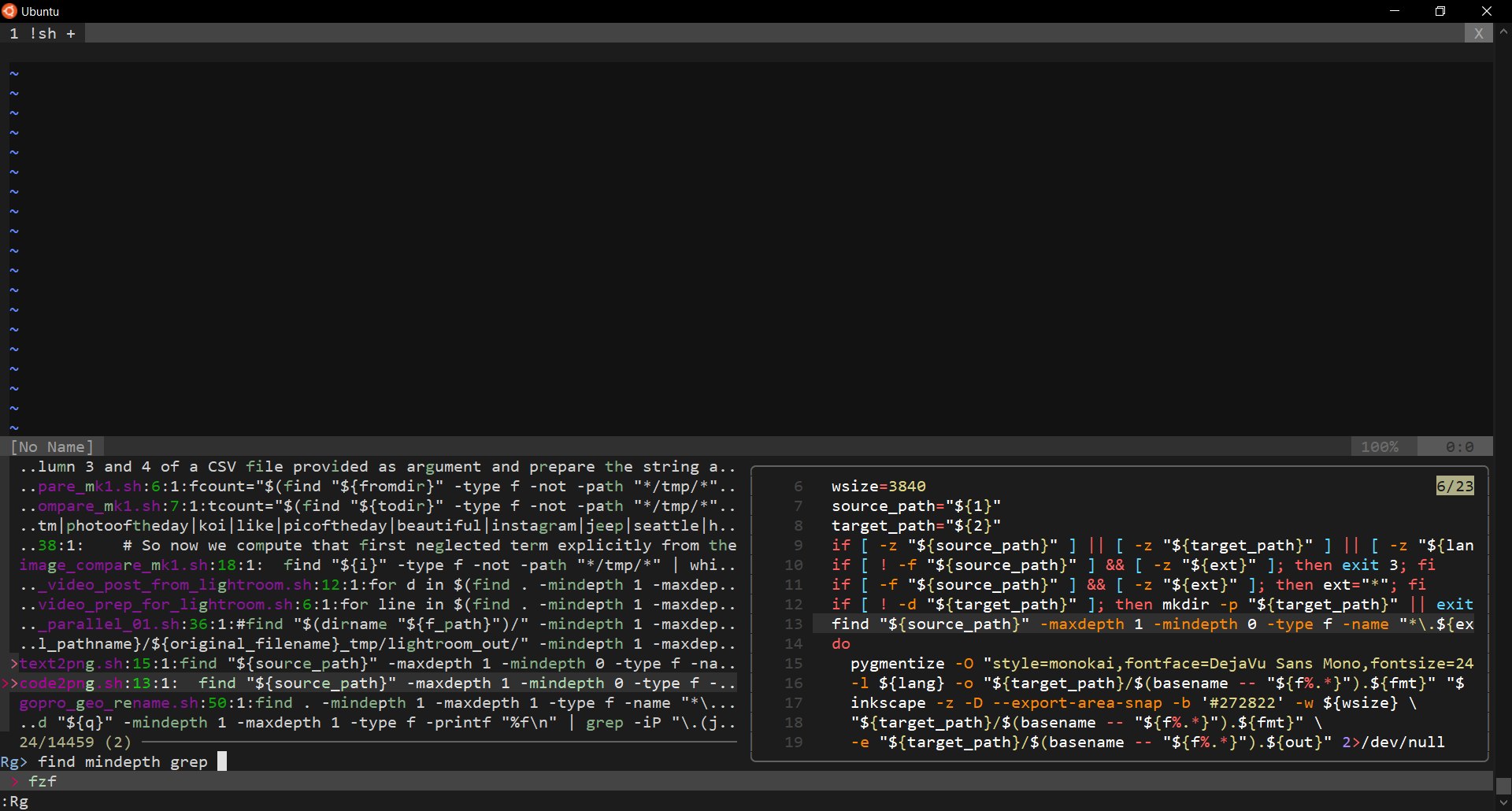
You can select multiple files by hitting Tab, and you can even do search-and-replace on multiple files and all subfolders:
# In VIM go the to the folder where you want to start your search-and-replace operation:
:cd ~/tempdir/

# Then run the search-and-replace commands:
:grep "old_pattern"
:cfdo %s/old_pattern/new_pattern/g | update

# Close out all open files
:qa
As a sysadmin, I spend much of my time searching the log files. Tools like Splunk and Elasticsearch are not always an option. The fzf tool can come in very handy:
# Even simple search cases like these can save you a lot of time
{ cat /var/log/messages & zcat /var/log/messages*gz; } | sort -k1Mr -k2nr -k3r | fzf
 { cat $(find /var/log/httpd/ -type f -mtime -7 -name "*_log" | grep igor); zcat $(find /var/log/httpd/ -type f -mtime -7 -name "*_log*gz" | grep igor); } | sort -k1Mr -k2nr -k3r | fzf

Experienced Unix/Linux System Administrator with 20-year background in Systems Analysis, Problem Resolution and Engineering Application Support in a large distributed Unix and Windows server environment. Strong problem determination skills. Good knowledge of networking, remote diagnostic techniques, firewalls and network security. Extensive experience with engineering application and database servers, high-availability systems, high-performance computing clusters, and process automation.
- junegunn. “fzf.” GitHub, 25 Nov. 2022, github.com/junegunn/fzf.
- BurntSushi. “ripgrep.” GitHub, 25 Nov. 2022, github.com/BurntSushi/ripgrep.
- sharkdp. “fd.” GitHub, 25 Nov. 2022, github.com/sharkdp/fd.
- sharkdp. “bat.” GitHub, 25 Nov. 2022, github.com/sharkdp/bat.
- junegunn. “fzf.vim.” GitHub, 25 Nov. 2022, github.com/junegunn/fzf.vim.